Booking.com for Business' architecture streamlines the shopping experience to a single screen itinerary that connects travelers from pick-up to drop-off. All elements of the itinerary are unified, so if you change the selection to a different outbound flight time, Booking.com for Business will intelligently update other items like your rental car pick-up time.
Booking.com for Business’ AI driven personalization engine gets to know your preferences, refining thousands of travel options to offer a single suggested itinerary based on travel patterns, preferences and travel policy.
If the suggestions are on the mark, select express checkout and in just a few clicks you've completed booking.
For each travel category, Booking.com for Business presents a “shortlist” of recommendations to streamline the shopping experience — 93% of completed bookings use shortlist suggestions.
Users can easily toggle between the suggested shortlist, a comparative grid view or full list view of all options.
The platform remembers your preferences and defaults to that display for the next time.
Booking.com for Business makes it easy to identify the lowest rate and highlights the potential savings against the selected flight option.
The platform provides key flight amenity information, including on-board availability of Wi-Fi or power outlets. You can review stats including on-time performance averages and typical delay times along a route.
Rental car depot locations can be searched for by airport or any address location, such as an office. The default times for the rental period are based on flight arrival and departure times selected.
Booking.com for Business offers 2.5 million properties, including hotels, B&Bs, home rentals and serviced apartments.
In addition to the list view and shortlist display options, results can also be viewed on an interactive map.
The algorithm will automatically search for hotels within the city center, but the default home point can be set to an office location or another address and the search radius can be manually adjusted.
Results can also be viewed via an interactive map.
Booking.com for Business will automatically search for rental car locations within the city center, but the default home point can be set to an office location or another address and the search radius can be manually adjusted.
For multi traveler bookings Zeno’s allocation logic allows travel arrangers to easily book and allocate the correct number of hotel rooms. Even from a single booking, Zeno will create separate reservations for each traveler, so each hotel reservation will be under the respective traveler’s name.
The TravelSafe capability in Zeno surfaces a trip's COVID-19 travel and safety requirements as well as destination-specific requirements at the point of sale, helping to remove the guesswork associated with interstate and international travel.
Travelers and travel arrangers can toggle between passport country of origin and vaccination status drop-downs to review the following information:
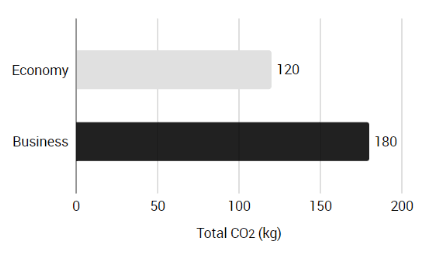
Zeno displays the carbon emissions associated with all flight options, taking into account the seat class and aircraft type making it easy to identify and select more sustainable booking choices. Zeno customers can also opt in to the Mission Zero integrated offset capability which directs funds to a selection of world-class, impactful environmental projects aligned to their preferences.
Zeno will automatically apply any available flight credits to a booking to reduce the risk of lost fares. Unused ticket credits are applied logically based on date of expiry.
Easily identify sustainable hotels — we've assessed and awarded sustainability badges to more than 100,000 properties in our system.
231 million reviews from real travelers make it easy to find the right stay for your trip.
Save at least 10% off publicly available rates on accommodations with the Genius loyalty program — all Booking.com for Business users automatically get access.


Lowest fare for your preferred carrier near your specified departure time




Lowest fare for your preferred carrier near your specified departure time


Lowest fare for your preferred carrier near your specified departure time
Lowest fare for your preferred carrier near your specified departure time

Lowest fare for your preferred carrier near your specified departure time

Lowest fare for your preferred carrier near your specified departure time

Lowest fare for your preferred carrier near your specified departure time
Lowest fare for your preferred carrier near your specified departure time